
One of the things that shook out of me building my own AI homelab was the need for storage. I stuffed a WD Black 3.6TB NVMe disk in it. That’s more than I’d ever need, right?
No.
I’m already at 22% disk use, and that’s from what I’d consider only a few months of gentle use. Model weights are consistently 50-100GB. Unless you’re deleting the models when you’re not using them (which, in fairness, is totally valid1), that adds up quickly. The Python UV cache is pretty big. I did my own INT8 quant of Gemma 4, which took up a substantial amount of space. All but one of the projects that run on the homelab are written for Node, and so I run Verdaccio as a local cache, and that takes up a sizable amount of space.
I can prune this, but I’d rather not. And pruning will eventually produce diminishing returns over time.
So I needed storage. And if I’m going to add storage to my setup, I might as well do it seriously. If I’m going to do storage, I should do backups. If I’m going to do backups, I should do all my backups. The homelab, after all, is only a small part of what I’m interested in and what I do.
I purchased a UNAS Pro 4 and a UNAS 4: one for the cabin (where the homelab lives) and one for my home in Raleigh2. I bought six 16TB HDDs (refurbished3), to be set up in a RAID 5 configuration in each UNAS: this gives me 32TB of storage in each site, and protects against one of the drives dying on me. It also leaves me room to install another 16TB disk in each site down the road (if I end up needing it). UniFi Drive also lets you replicate data from one UNAS to another, which lets me keep a nightly off-site backup for extra peace of mind.
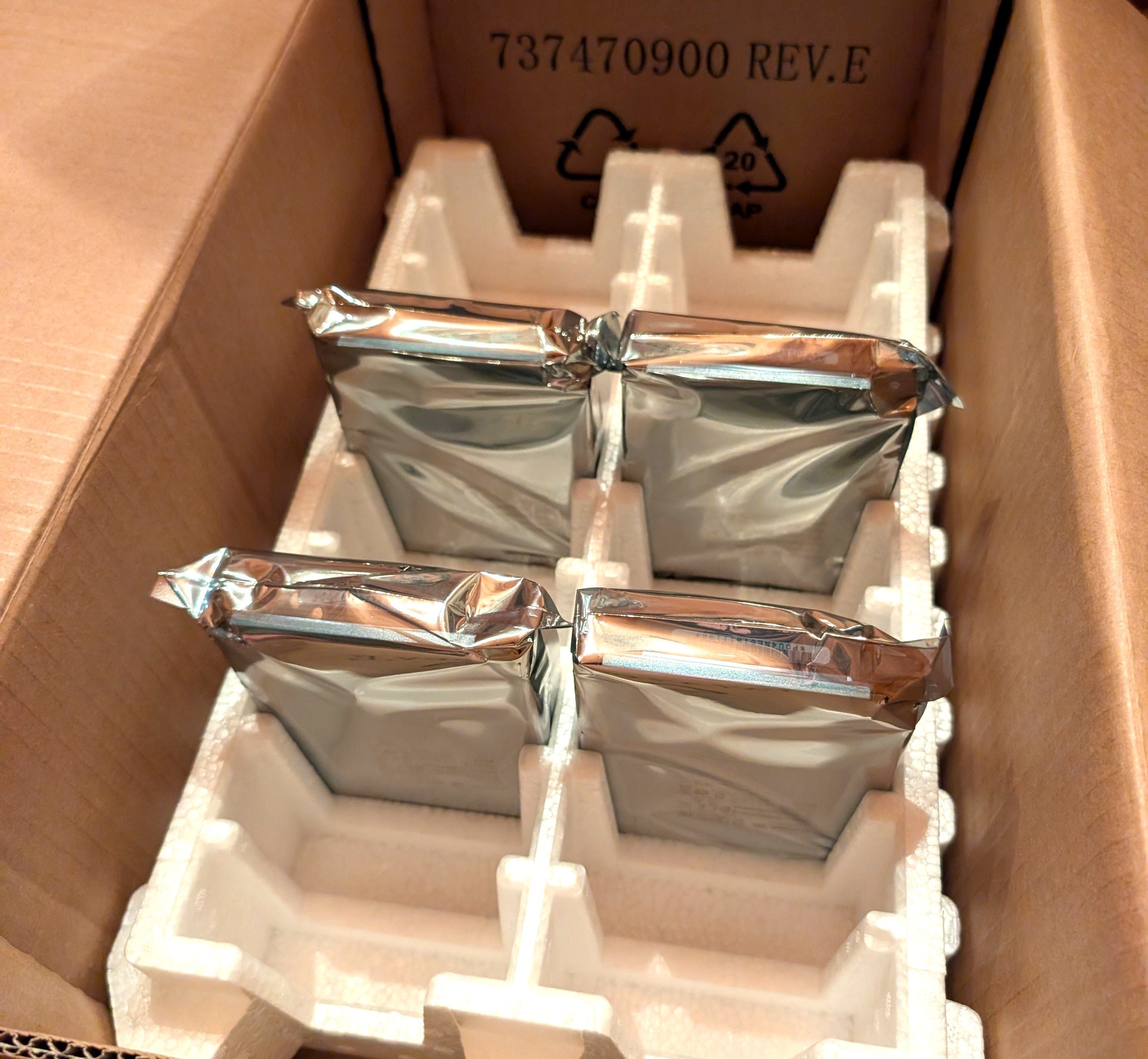
Each HDD took about 40 hours to burn in with badblocks. This fills up each disk with data, then reads it back and checks that everything works end-to-end. If there are errors, I can return the disk to the seller within 30 days for a replacement.
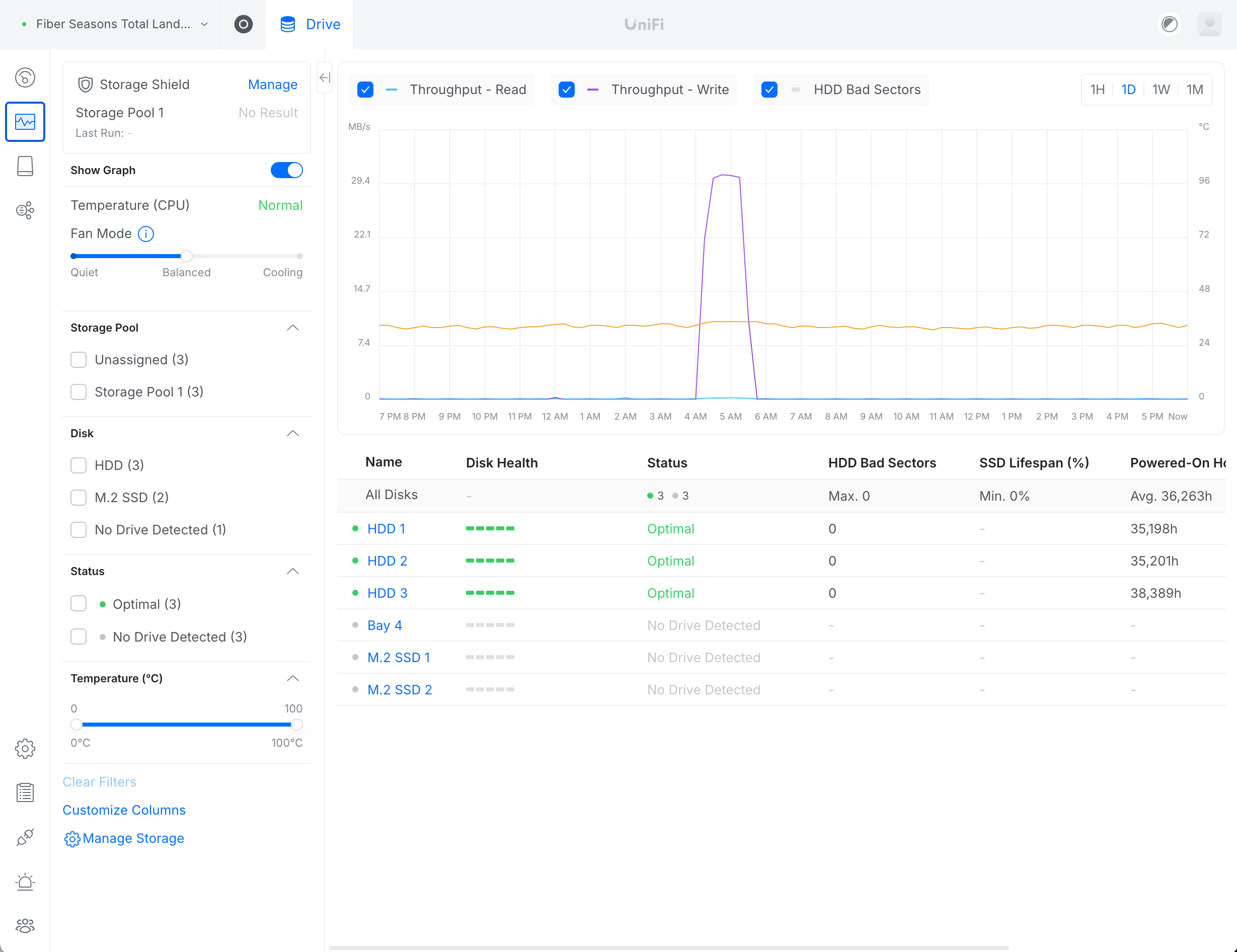
Setting this up has been a lot of fun, actually. It’s allowed me to pull down the ~100GB of archives I have from Amazon so I can avoid the $0.88/mo that I’m paying to AWS. I pulled out my lucky dip Basket of Old Hard Drives that I keep around from all the computers I’ve thrown away and pulled all my old files off of those. I pulled 700GB of files off of my 2015 iMac. I pulled 70GB of files off of my MacBook Pro, 350GB of files off my Mac Studio. I set up Time Machine on everything. I set up Time Machine on my partner’s laptop. I ran Google Takeout and uploaded those to the storage cluster. I set up restic to back up all of the important stuff on Daddy.
Right now, I’m sitting at about 1.5TB of data (and a second 1.5TB for the replicated copy).
Why am I telling you this? Well, as nice as UniFi Drive’s web UI is (it’s like a mini Dropbox), the primary way to use it is SMB (network mounts on your desktop). If I’m on my phone and want to access that data, I either need an application running on a computer on my tailnet that’s able to access it for me, or I need a Samba client.
Well I use Android, and the best Samba client I can find is SambaLite4. It’s an open source app, and truth be told it’s been very reliable and fast. What I don’t love about it is that it doesn’t feel like good software.
Here’s a screenshot from the Google Play store, which really serves as a great example for why I feel this way:
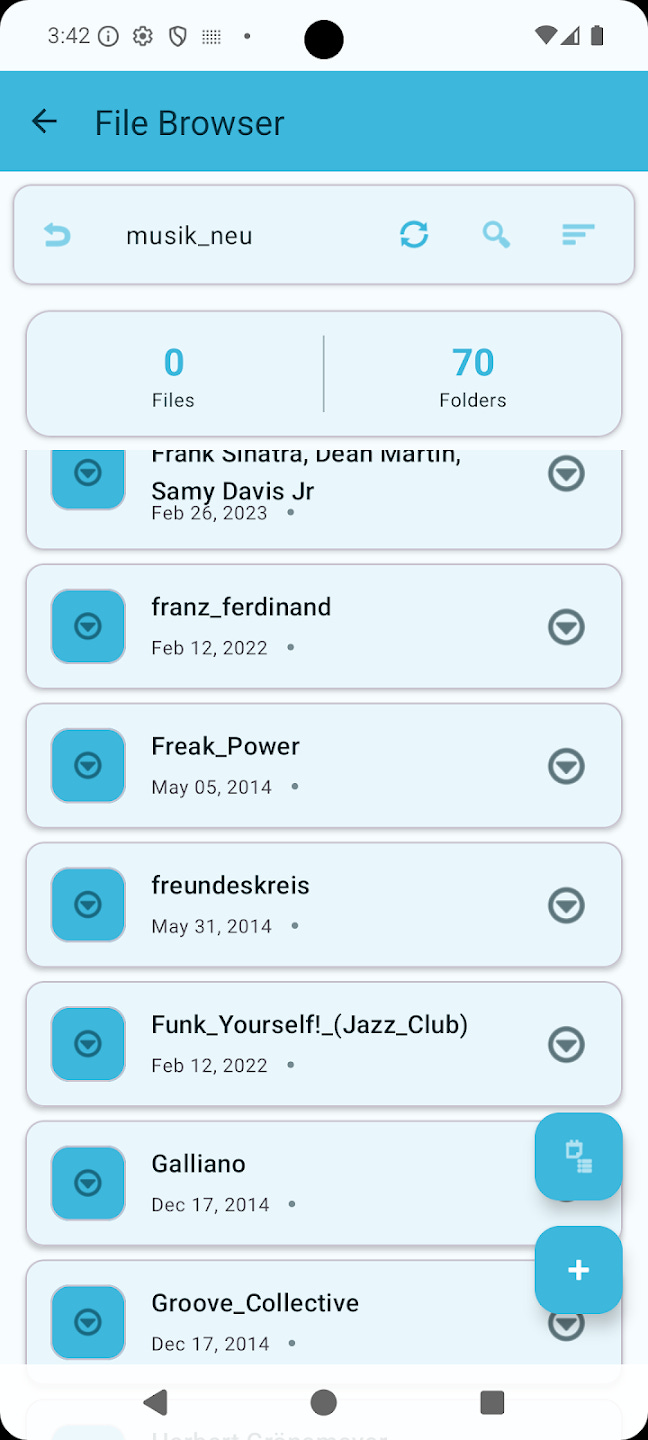
There’s a lot to talk about here, so let me quickly go over the things that feel Less Than Good about this to me:
There are three headers. The top header simply says “File Browser” with a back arrow that only takes you back to the list of network shares. The second header shows the path of the current folder with a series of actions and an “undo” button that acts as a “go to parent directory” button. The third header (which is sticky) just shows the number of files and folders in the current directory.
Each item in the file list is represented by a card rather than a list item. Each card has margin, padding, and a drop shadow.
The icon for folders, mysteriously, is a circled down-chevron icon. Each item in the file list also features that same icon on the right side as a context menu button for interacting with the file or folder.
Files normally show a date (presumably the creation date?), a bullet, and the file size. Folders do not have a file size, but still show the bullet.
There are two Material-style action buttons in the bottom right: a plus (intuitively “upload”) and a “calendar with a list next to it” icon (unintuitively “new folder”).
The file list is a container below the third header: it does not slide “under” the headers above it. This results in the cards in the file list appearing cut off abruptly as you scroll.
Everything is cyan, regardless of whether you use Material You. Dark mode is questionably dark.
I won’t admit to being a master of UI design, but there are some obvious things that can be improved here:
You only need one action button (a plus) that shows a menu with other options.
The second and third headers are unnecessary. The actions on the right edge of the second header can go in a kebab menu in the upper right. The words “File Browser” do not need to be present, and there should be only one notion of “back” (matching the back behavior of the OS—which should go to the parent folder, or the network share if you’re in the root).
Folders should have a folder icon.
The context menu button on the file list should be a menu icon (probably a kebab menu icon).
None of this should be especially controversial: Android comes with two different file apps: Google Drive and Files. Both have well-established patterns for essentially everything this app does. The best course of action is simply to copy what Google did.
Since it’s an open source app, I decided to just pull the source code and throw Claude Fable 5 at it. With maybe twenty minutes of effort total, here’s where I ended up:
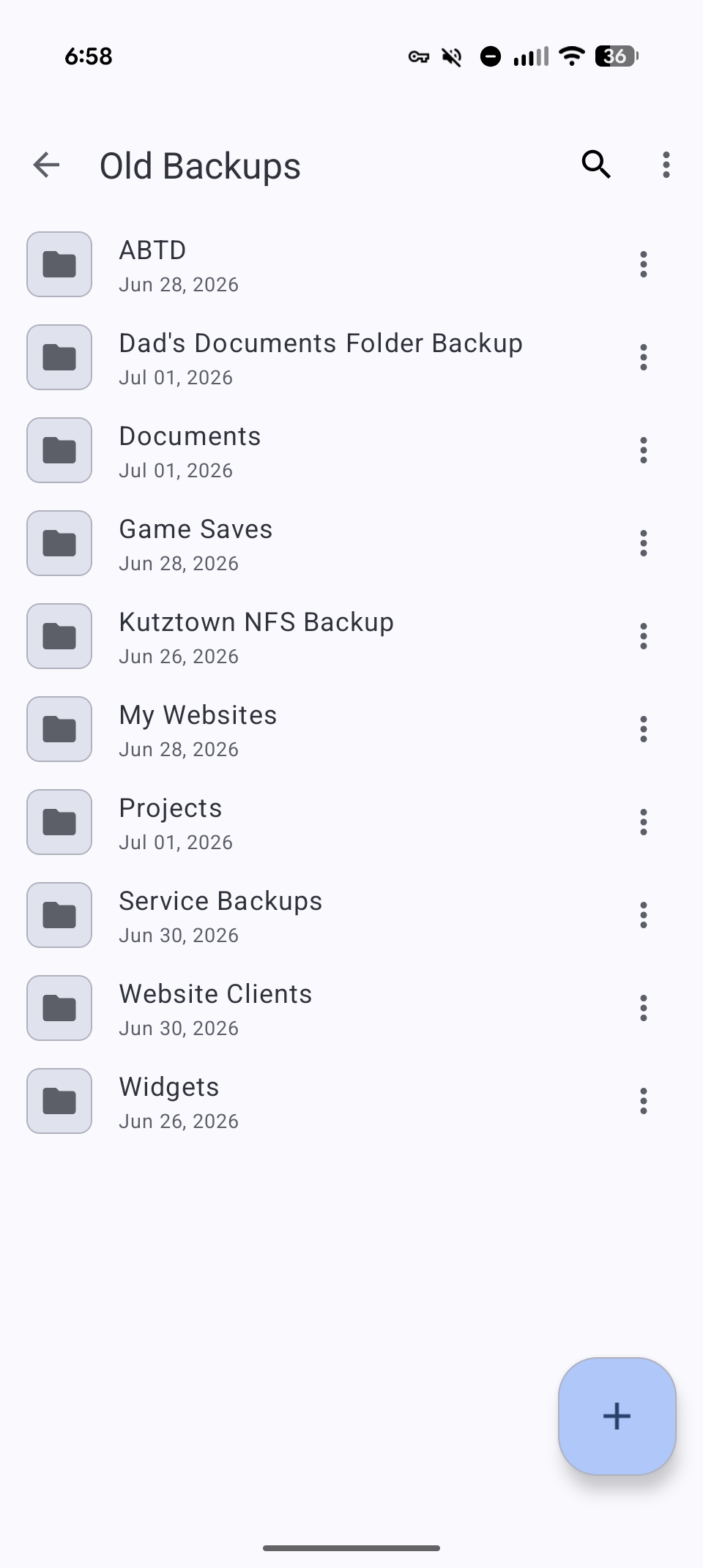
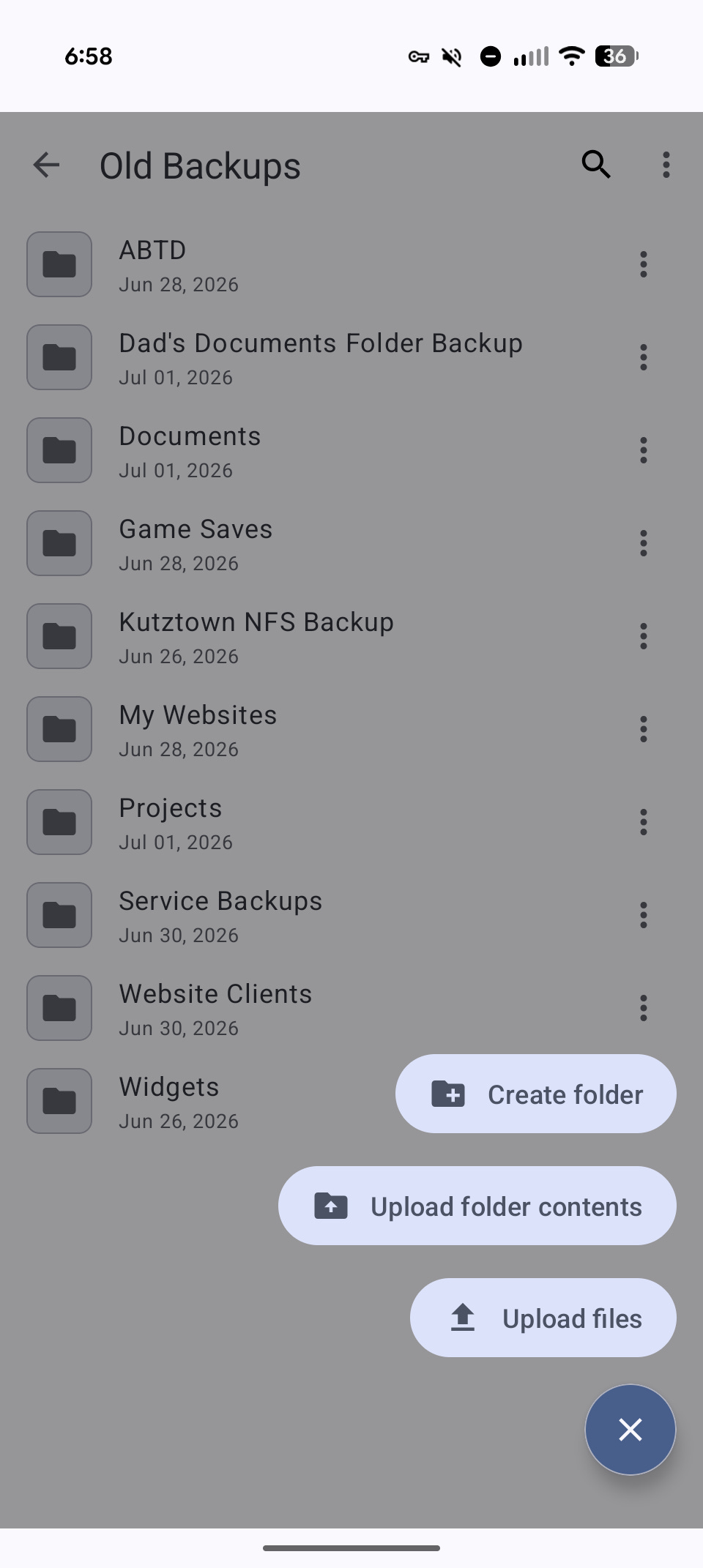
Not only did I have Claude make it look pretty darn okay, I had it implement some real quality of life features:
When you tap on an image, PDF, text, or audio file, it loads a lightbox with a player instead of offering to download the file and choose an app5. It has tap and pinch to zoom, as you’d expect.
When you’re in a folder of media and open the lightbox, you can swipe left and right between the files.
Claude synthesized new icons for everything.
On top of that, Claude has been diligent about putting every improvement on its own branch and merging to my fork’s main responsibly, so if I ever wanted to attempt to upstream any of this stuff, it wouldn’t be all that hard.
Here’s the thing: this is unbelievable. I’m not even sure I want to upstream it. I’m not sure I care enough to go through the trouble of taking twenty minutes of vibe coding and sorting through it. That would require me to brush up on my Android Java, which I haven’t written since ~2013. Making the PRs adhere to the (very reasonable!) contributor guidelines of the project is a lot of up-front work for me.
Doing this, I realized that literally anyone can do this. The most effort I expended was running a brew command for Claude (because it couldn’t use sudo), complaining about the UI choices in the app, and plugging in my phone. Sure, I could pour a whole bunch of time and effort into making the project better, but if anyone else with a Claude subscription can reasonably do this (or clone my fork, if they wanted to), it’s actually completely moot.
Moreover, I built this to appeal to my own sensibilities. Who knows, maybe the fellow who maintains SambaLite has an affinity for the “calendar with a list icon next to it” symbol he’s using for the “new folder” icon. Maybe someone else wants a little rocketship emoji, or an animated cat that skitters around the screen. I don’t know, and I’m not sure it’s even my place to take my own low-effort project and try to upstream it.
I have Duke Energy for my power company. They graciously provide you with a giant XML dump of your hourly energy use data for the last year. For a long time, I’d been meaning to analyze this to see what the right rate plan for me is. A couple months ago, I had Opus 4.7 one-shot it. It did, and the resulting artifact showed that without changing any energy use patterns at all, I could save a few hundred dollars a year just by switching to the R-TOU rate plan. Setting a schedule for my EVs would lower my costs even further.
Last week, I was thinking about a home battery system. I don’t have solar, but with batteries, I could buy energy during the rate plan discount period and use it during the times of day where power is more expensive6. I loaded up the project again and gave it this prompt:
This repository is a tool for analyzing Duke Energy usage data to identify the best rate plan. I'd like to update it to allow a mode that allows you to input the parameters for a home battery system (kWh capacity, charge rate, discharge rate, etc.). The UI should show how much money could be saved with each rate plan by having a home battery system. For the standard residential plan, this is presumably zero (since power costs the same all day). With other rate plans, if the system buys energy while it's cheap and discharges while it's expensive, it would be good to know the savings as well as the time to pay off such a system.
I walked away, watered my garden, and when I returned, it had a working solution.
Ten minutes of playing with the knobs later, I realized that none of the battery systems I was considering would pay themselves off within 15 years. So I thought, what would the maximum savings be? So I prompted with:
Can you add another view that simulates a "perfect" battery setup's savings for each rate plan? That is, if you imagine a battery that can charge at any rate, discharge at any rate, and has unlimited capacity, what would the savings be?
1. For the standard residential plan, the savings is presumably always zero.
2. For TOU plans where there are fixed discount windows, the savings is just assuming all energy is purchased at the lowest possible price.
3. For TOU plans where there's a demand component, this is trickier because you want to minimize the demand charge, so you need to compute how much energy is required and then figure out which hour(s) to purchase it
Two and a half minutes later, I had my answer. Even with a hypothetical perfect battery, the cost savings wouldn’t be worth it. I scrapped the idea.
This isn’t news. “Man uses LLM to write code” isn’t something worth blogging about on its own. What’s interesting to me about this is that the software I YOLOed is a whole-ass business model. Two years ago, if someone knocked on my door and said, “For $100 we’ll tell you how you can save money on your power bill by optimizing your rate plan, and for another $100 we’ll size out a home battery system,” I’d have taken them up on it.
Anyone can do this for anything. If you run a software startup, beware: anyone can have their LLM of choice whip up the subset of your product that they care about, running at cost.
In the not-so-distant future, the only reason to pay for subscription software is because it meets any of these criteria:
The subset of features you care about is large enough that having the LLM build it is challenging or impractical.
The cost of running the infra yourself is too high7.
Getting the level of polish you need requires a level of effort with the LLM that’s just not worth it. UI/UX polish, regular data updates, robust accessibility support—that sort of thing.
This even applies to free services. If you run freemium software, your users may just be willing to pay a few bucks a month for their own custom-tailored version that doesn’t nag them to upgrade. And that’s assuming they can’t run their own code on the free tier of their IaaS platform of choice or homelab.
Another less interesting insight is that there’s going to be a real need for ways to share downstream OSS modifications. If 100 people each take SambaLite, fork it, and customize it to their own tastes, we need something like the GitHub Network view for identifying those modifications and being able to cherry-pick them. It’s unreasonable to assume the maintainer of SambaLite is going to pull in anything and everything good that comes down the pipe. But a key aspect of free software is that anyone can change anything and share it, and right now those changes are undiscoverable and impossible to share.
There’s a world where I can say “Hey Claude, I want to make a better SambaLite” and it goes out and finds all these modifications and lets me pick which ones to tie together, identifying mutually exclusive features and figuring out how to Frankenstein them together into an app that compiles and installs. I’d love for that to exist.
Before I go: if you’re the maintainer of SambaLite and you want to work on gussying up the UI, I’d be more than pleased to at least chat. Drop me a line!
The obvious caveat being you need to download them again later if you ever want to load them up again—if they’re even still online.
They’re named Usain and Urkel.
Recertified disks are not available at this time due to the outrageous data center demand. That’s why I settled for refurbished.
I will not tell you how much I paid for them, but if you see Ursula the sea witch please do not tell her where I am.
Project page: https://github.com/egdels/SambaLite
You can still do those things, but they’re in the menu now.
We also have a surprising number of power outages here, and having batteries would mitigate the problems that arise from that.
Consider software where the cost of self-hosting it is impractical because you need an economy of scale to feasibly run the infrastructure. If you need bandwidth to host your popular podcast, for instance, it might just be cheaper to buy a $10/mo Pinecast subscription than it would be to pay for a premium Cloudflare subscription or a box running on Hetzner.
I do think you're mostly right that SaaS is a losing game at the moment but I do think there's one more case where it can still be valuable, which is if you have a valuable dataset that's hard to replicate.